January 21st, 2026
New
What's new
ASTRA now includes combined transaction charges and taxes directly in Net P&L calculations. It automatically factors in brokerage, exchange fees, and applicable taxes so your profit and loss reflects actual post-cost performance.

Why this matters
Most traders look at gross P&L and underestimate the drag from charges and taxes. Because these costs vary by broker, product, and trading style, ignoring them can give a misleading view of returns. With Net P&L including all costs, you see the real money made or lost, not just headline numbers.
What you can do now
View accurate Net P&L across all your trades with all charges and taxes factored in. Compare your trading performance with real profitability metrics. Optimize your trading decisions based on actual net returns, not gross returns.
How to calculate charges
Use the Calculate Charges button in the actions column to compute charges for a single trade.

Select multiple trades and click Calculate Charges near the table header to bulk-calculate charges.

While adding a manual trade, click Calculate Charges next to the Charges input to auto-fill the cost.

Important note
This feature is currently in a testing/beta phase while broker-wise integrations are validated for charge accuracy. ASTRA is working with major brokers to ensure precise, broker-specific cost calculations across all supported accounts
December 22nd, 2025
New
What's New
We have enabled support for positional and overnight trades on ASTRA. This addresses one of the most requested features from our trader community - the ability to properly journal trades that span multiple days or longer holding periods.

Why This Matters
Positional traders now have a basic requirement covered: the ability to sync and track trades that go beyond intraday. Whether you're holding for a few days or multiple weeks, ASTRA now supports your trading style.
What You Can Do Now
Sync positional trades alongside your day trades Track multi-day holding periods and overnight positions Journal trades that span beyond a single trading session Review execution quality across extended timeframes
Important Note
This feature is newly released in beta and may have issues. You can continue journaling normally while we polish things.

Feedback
Thanks to everyone who requested this feature and engaged with us about it. Positional and overnight trade support is important, and we're actively delivering on this fundamental improvement to ASTRA.
December 15th, 2025
New

ASTRA is now integrated with Groww, enabling Groww traders to securely sync their trades into ASTRA and get deeper behavioral and performance insights without manual credential sharing.

Secure Account Connection
Groww traders can now connect their accounts with ASTRA without sharing any manual credentials. Once connected, trades flow automatically into ASTRA and are translated into clear performance insights.

Deeper Insights Beyond P&L
• Move beyond surface-level profit and loss to understand execution quality, behavior patterns, and consistency • Visualize how you actually perform across days, setups, and different market conditions • Get actionable insights covering execution, behavior, and consistency metrics
Performance Analytics
This integration helps traders understand how they actually trade across:
• Different trading days and sessions • Various setups and strategies • Changing market conditions • Behavioral patterns and decision-making quality
Why This Matters
This collaboration with Groww enables secure access and supports tools that encourage better decision-making for Indian traders. ASTRA continues to evolve around one goal: helping traders build discipline through data.

December 8th, 2025
New
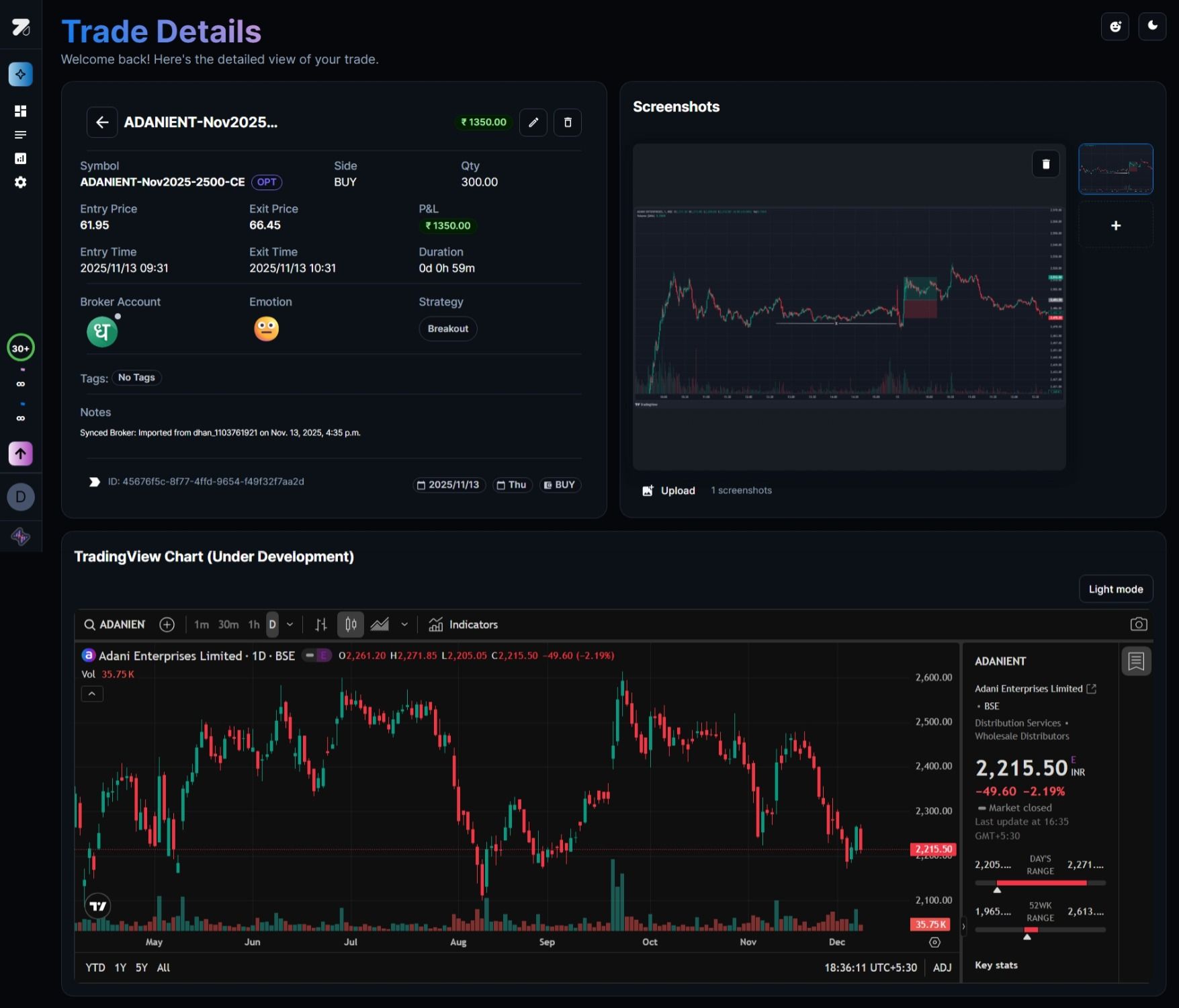
Now you can see every detail of your trades in one focused view. Upload screenshots of your setups, track all the metrics that matter, and build a visual journal of your trading journey.
What's included
Complete trade snapshot — Entry, exit, P&L, duration, and all your notes live together on one page
Screenshot uploads — Attach one or multiple images of your charts, DOM, or broker screens to document exactly what you saw
Embedded chart context — View price action alongside your notes and screenshots without jumping between tabs
Full customization — Add tags, emotion, strategy, and revisit every detail during your reviews
Why this matters for traders
Really effective trade reviews need more than just numbers. You need to see what the setup actually looked like, spot patterns in your winners and losers, and build real playbooks based on evidence. That's why serious traders journal their charts.
How to use it
Open any trade from your journal by clicking 👁 button in the actions column and step into the new Trade Details view. Upload your chart screenshots on the right panel, add your notes and tags, and you've got a complete case study you can revisit anytime.